
|
SortServicesX |
| adds sort menus to Services menu |
| Current Version: | 1.5 (Apple Silicon/intel 64-bit Universal Binary) |
| Release Date: | 2026-05-12 |
| System Requirements: | macOS 11.5 or later (macOS Tahoe compatible; Apple Silicon/64-bit intel Mac only) |
| Language: | Japanese, English |
| License: | Freeware |
| File Size: | 152 KB >> Download now |
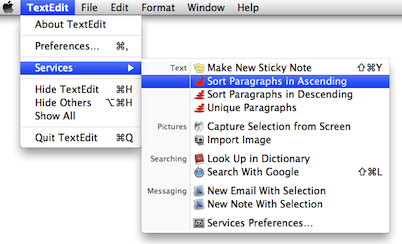
SortServicesX is a small application which adds the paragraph sort menus to the Services menu. You can sort paragraphs in the document of the Services compliance applications (such as TextEdit, Mail etc.) by choosing menu item from the Services menu.SortServicesX sorts paragraphs in the same order as Finder list view.
Drag SortServicesX to /Applications or ~/Applications folder.
You can open SortServicesX with normal procedure:Then re-login, SortServicesX items show on Services in Application menu and contextual menu. Check the SortServicesX items on System Preferences Keyboard > Keyboard Shortcuts > Services pane if there are no SortServicesX items on Services.
- Double click the application icon to open it.
- Click "Open" button on the confirmation dialog.
Drag SortServicesX to the trash.
1.5 2026-05-12
- system requirements changed to macOS 11.5 or later (Apple Silicon/64-bit intel Mac only).
- notarized application made.
- Apple Silicon chip native supported.
1.1 2010-07-24
- 64-bit code added.
- application icon added.
1.0 2008-11-06
- initial release